> ## Documentation Index
> Fetch the complete documentation index at: https://docs.mixroute.ai/llms.txt
> Use this file to discover all available pages before exploring further.
# OpenCode
> OpenCode Integration Guide: Multi-model programming assistant via MixRoute.
## Introduction
OpenCode is an open-source AI programming assistant supporting 75+ models and local deployment. With **MixRoute API**, you can use various mainstream and latest models (GPT, Claude, Gemini, etc.) in OpenCode with custom provider and model configuration.
**Download**: [https://opencode.ai/](https://opencode.ai/)
## Quick Configuration
### 1. Get API Key
Create and copy your API key from [MixRoute Console](https://api.mixroute.ai/).
### 2. Configure Custom Provider in OpenCode
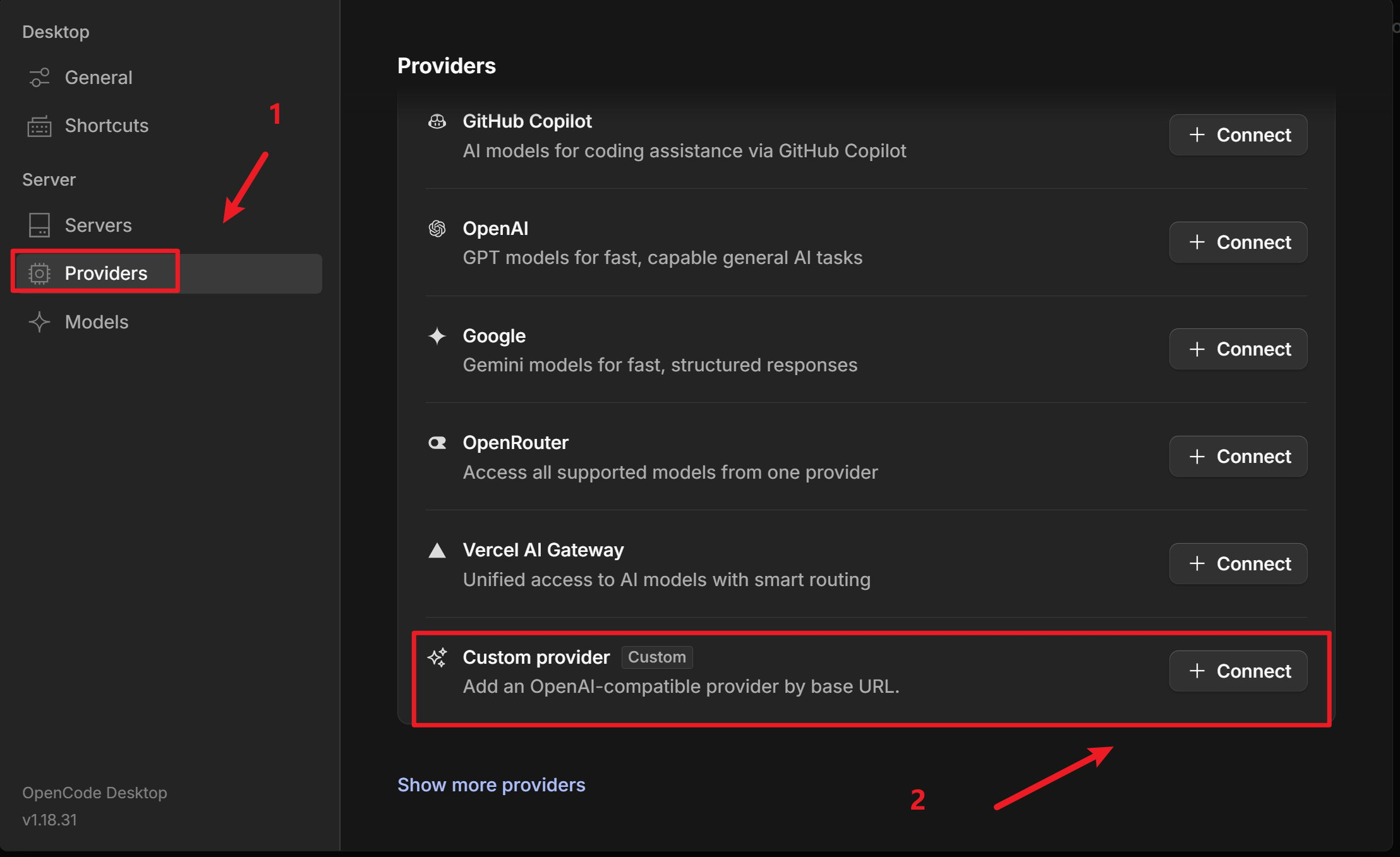
Open OpenCode, go to **Server / Provider** settings
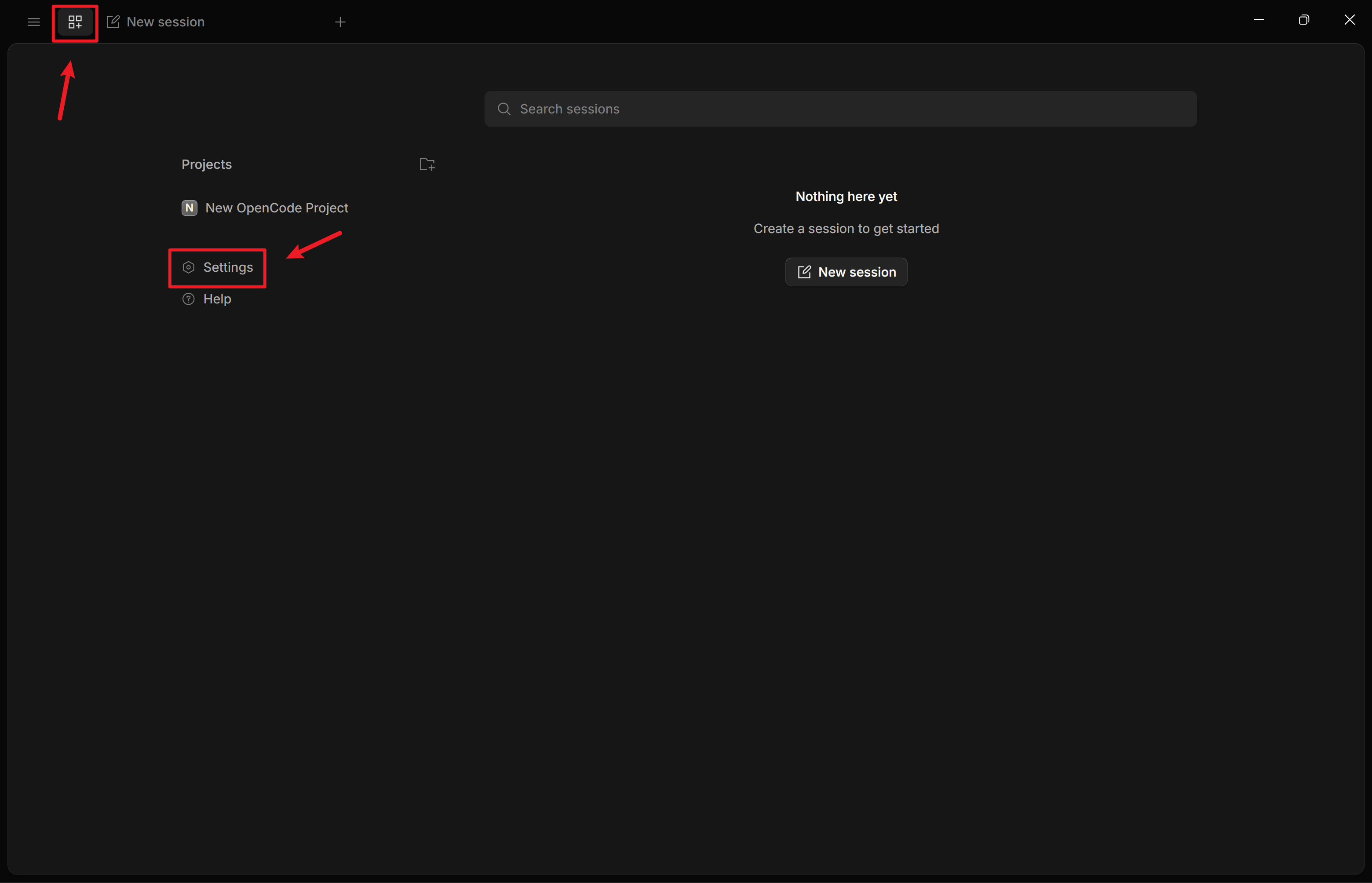 Add **Custom Provider** (Configure an OpenAI compatible provider)
 [Smart Routing](https://console.mixroute.ai/smart-route) is an intelligent model routing capability that automatically distributes requests to the most suitable model based on task complexity, reducing API costs while enhancing efficiency.
See [here](/smart-routing) for constraints and usage guide.
* **Provider ID**: e.g., `mixroute-route` (lowercase, numbers, hyphens or underscores)
* **Display Name**: e.g., `Mixroute Api Route`
* **Base URL**: `https://api.mixroute.ai/v1` (must end with `/v1`)
* **API Key**: Paste your Mixroute Api Smart Routing node key
Note that Smart Routing node keys are independent and not shared with traditional API keys.
* **Provider ID**: e.g., `mixroute` (lowercase, numbers, hyphens or underscores)
* **Display Name**: e.g., `Mixroute Api`
* **Base URL**: `https://api.mixroute.ai/v1` (must end with `/v1`)
* **API Key**: Paste your Mixroute Api key
Add models you need (e.g., `gpt-5.5`, `claude-opus-4-8`)
[Smart Routing](https://console.mixroute.ai/smart-route) is an intelligent model routing capability that automatically distributes requests to the most suitable model based on task complexity, reducing API costs while enhancing efficiency.
See [here](/smart-routing) for constraints and usage guide.
* **Provider ID**: e.g., `mixroute-route` (lowercase, numbers, hyphens or underscores)
* **Display Name**: e.g., `Mixroute Api Route`
* **Base URL**: `https://api.mixroute.ai/v1` (must end with `/v1`)
* **API Key**: Paste your Mixroute Api Smart Routing node key
Note that Smart Routing node keys are independent and not shared with traditional API keys.
* **Provider ID**: e.g., `mixroute` (lowercase, numbers, hyphens or underscores)
* **Display Name**: e.g., `Mixroute Api`
* **Base URL**: `https://api.mixroute.ai/v1` (must end with `/v1`)
* **API Key**: Paste your Mixroute Api key
Add models you need (e.g., `gpt-5.5`, `claude-opus-4-8`)
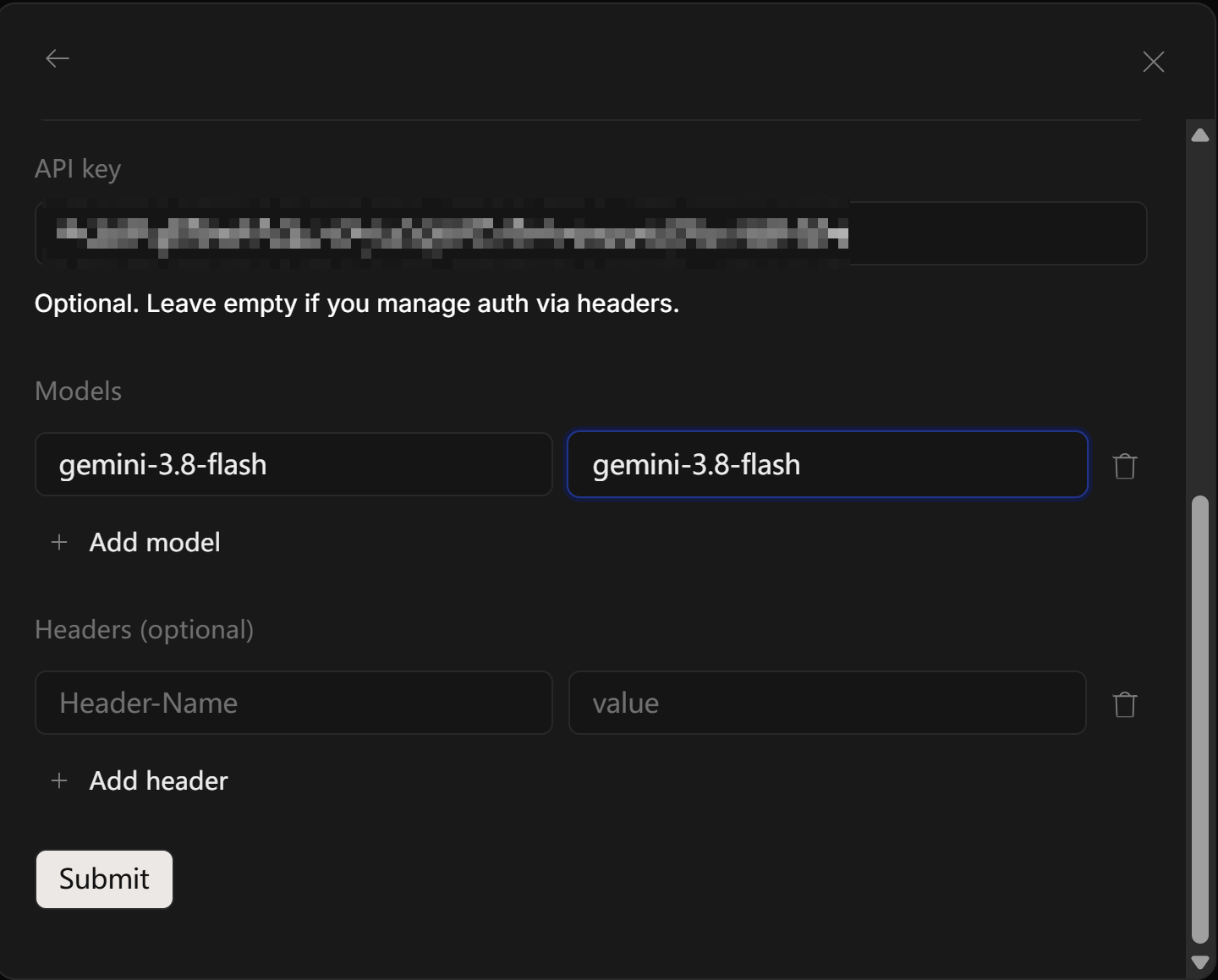 Use **ProviderID/ModelID** format (e.g., `mixroute/gpt-5.5`)
### 3. Switch Models
Select configured provider and model in chat or settings (e.g., `mixroute/gpt-5.5`).
## Models Requiring Responses API
Some models require **Responses API** instead of Chat Completions. If you see this error:
> The chatCompletion operation does not work with the specified model
Add additional providers to use the response:
```jsonc theme={null}
{
"$schema": "https://opencode.ai/config.json",
"disabled_providers": [],
"provider": {
"mixroute": {
"name": "mixroute",
"npm": "@ai-sdk/openai-compatible",
"options": {
"baseURL": "https://api.mixroute.ai/v1"
},
"models": {
"gemini-3.8-flash": {
"name": "gemini-3.8-flash"
}
}
},
"mixroute-responses": {
"name": "mixroute-responses",
"npm": "@ai-sdk/openai",
"options": {
"baseURL": "https://api.mixroute.ai/v1",
"apiKey": "mixroute-key"
},
"models": {
"gpt-5.6-luna": {
"name": "gpt-5.6-luna"
},
"gpt-5.6-terra": {
"name": "gpt-5.6-terra"
},
"gpt-5.6-sol": {
"name": "gpt-5.6-sol"
}
}
}
}
}
```
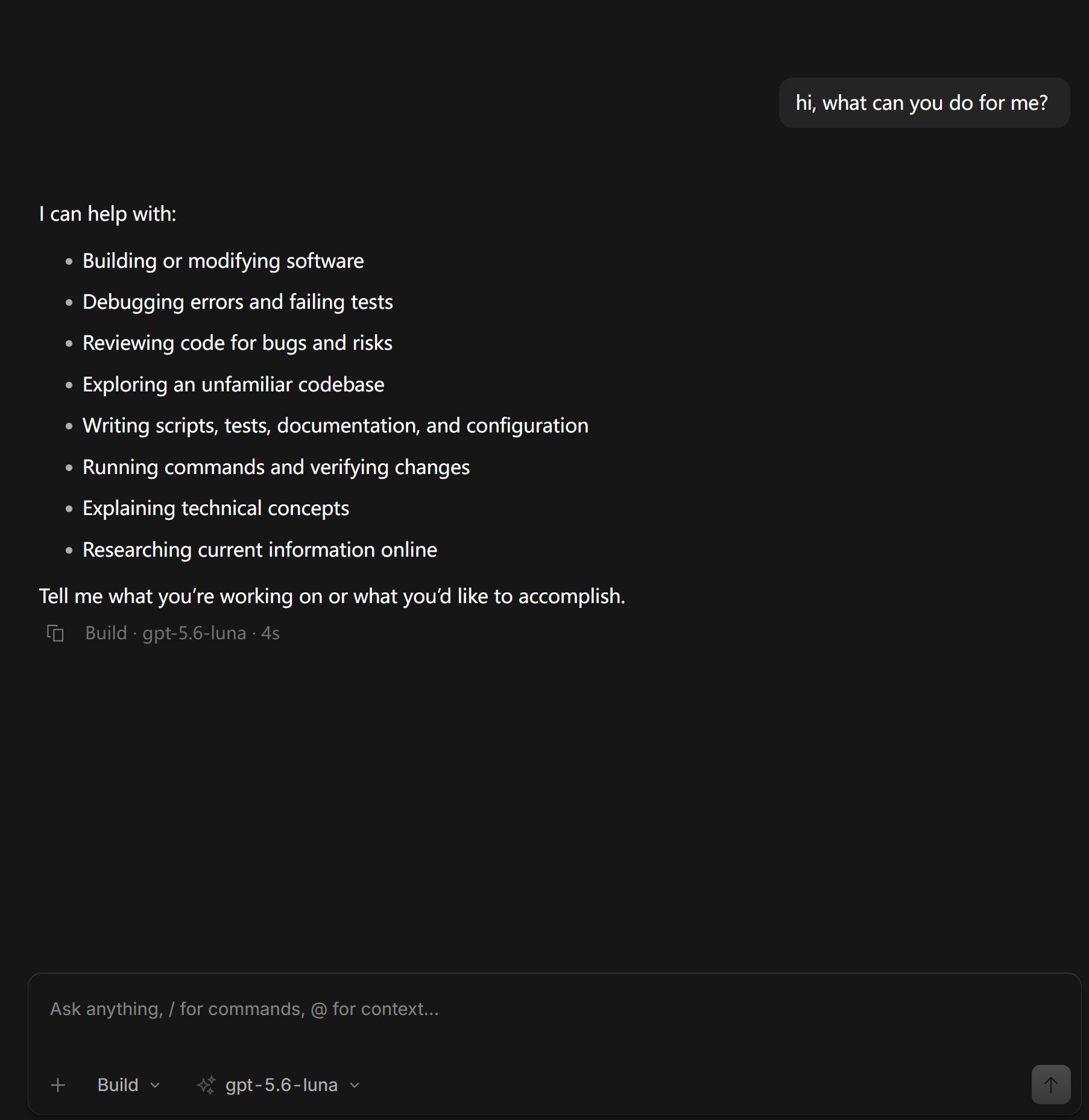
## Configuration Success Example
Below is an example of normal conversation using Mixroute Api in OpenCode:
Use **ProviderID/ModelID** format (e.g., `mixroute/gpt-5.5`)
### 3. Switch Models
Select configured provider and model in chat or settings (e.g., `mixroute/gpt-5.5`).
## Models Requiring Responses API
Some models require **Responses API** instead of Chat Completions. If you see this error:
> The chatCompletion operation does not work with the specified model
Add additional providers to use the response:
```jsonc theme={null}
{
"$schema": "https://opencode.ai/config.json",
"disabled_providers": [],
"provider": {
"mixroute": {
"name": "mixroute",
"npm": "@ai-sdk/openai-compatible",
"options": {
"baseURL": "https://api.mixroute.ai/v1"
},
"models": {
"gemini-3.8-flash": {
"name": "gemini-3.8-flash"
}
}
},
"mixroute-responses": {
"name": "mixroute-responses",
"npm": "@ai-sdk/openai",
"options": {
"baseURL": "https://api.mixroute.ai/v1",
"apiKey": "mixroute-key"
},
"models": {
"gpt-5.6-luna": {
"name": "gpt-5.6-luna"
},
"gpt-5.6-terra": {
"name": "gpt-5.6-terra"
},
"gpt-5.6-sol": {
"name": "gpt-5.6-sol"
}
}
}
}
}
```
## Configuration Success Example
Below is an example of normal conversation using Mixroute Api in OpenCode:
 This documentation is built and hosted on [Mintlify](https://mintlify.com), a developer documentation platform.