> ## Documentation Index
> Fetch the complete documentation index at: https://docs.mixroute.ai/llms.txt
> Use this file to discover all available pages before exploring further.
# OpenWork
> OpenWork Integration Guide: Use multiple AI models in OpenWork through MixRoute
## 1. Introduction
OpenWork is an open-source AI coding assistant that supports 75+ models and local deployment. Through **MixRoute**, you can access a wide range of mainstream and cutting-edge models (such as GPT, Claude, GLM, etc.) in OpenWork, with full support for custom providers and model configuration.
**Download**: [https://openworklabs.com/](https://openworklabs.com/)
## 2. Quick Setup (MixRoute)
### 2.1 Get an API Key
Create and copy an API key from the [Mixroute API Console](https://api.mixroute.ai/).
### 2.2 Configure a Custom Provider in OpenWork
OpenWork supports adding custom providers via a JSON configuration file. It is recommended to configure at the workspace level rather than globally.
Create or edit the config file in your OpenWork workspace:
`/path-to-your-workspace/.config/opencode/opencode.json`
Adding custom providers to the global location `~/.config/opencode/opencode.json` is not recommended. OpenWork prioritizes workspace-level configuration; global settings will be overridden and ignored.
Add the corresponding provider configuration based on the integration method:
For models supporting Chat Completions, use `@ai-sdk/openai-compatible`:
```json theme={null}
{
"$schema": "https://opencode.ai/config.json",
"disabled_providers": [],
"provider": {
"mixroute-compatible": {
"name": "mixroute-compatible",
"npm": "@ai-sdk/openai-compatible",
"options": {
"baseURL": "https://api.mixroute.ai/v1",
"apiKey": "{env:MIXROUTE_API_KEY}"
},
"models": {
"glm-5.3": {
"name": "glm-5.3"
}
}
}
}
}
```
Using `@ai-sdk/openai-compatible` gives you the broadest compatibility, covering most models that support the Chat Completions protocol.
Some models require the Responses API protocol. Use `@ai-sdk/openai` for these:
```json theme={null}
{
"mixroute-responses": {
"name": "MixRoute OpenAI Responses",
"npm": "@ai-sdk/openai",
"options": {
"baseURL": "https://api.mixroute.ai/v1",
"apiKey": "{env:MIXROUTE_API_KEY}"
},
"models": {
"gpt-5.6-luna": {
"name": "gpt-5.6-luna"
},
"gpt-5.6-terra": {
"name": "gpt-5.6-terra"
},
"gpt-5.6-sol": {
"name": "gpt-5.6-sol"
}
}
}
}
```
See [Section 3](#3-responses-api-required-for-some-models-important) for which models require Responses API.
Claude models connect via `@ai-sdk/anthropic`:
```json theme={null}
{
"mixroute-messages": {
"name": "MixRoute Anthropic messages",
"npm": "@ai-sdk/anthropic",
"options": {
"baseURL": "https://api.mixroute.ai/v1",
"apiKey": "{env:MIXROUTE_API_KEY}"
},
"models": {
"claude-sonnet-5": {
"name": "claude-sonnet-5"
}
}
}
}
```
Save the configuration file and restart OpenWork. The configured providers and models will appear in the model selection list.
**Complete configuration example** (all providers combined):
```json theme={null}
{
"$schema": "https://opencode.ai/config.json",
"disabled_providers": [],
"provider": {
"mixroute-responses": {
"name": "MixRoute OpenAI Responses",
"npm": "@ai-sdk/openai",
"options": {
"baseURL": "https://api.mixroute.ai/v1",
"apiKey": "{env:MIXROUTE_API_KEY}"
},
"models": {
"gpt-5.6-luna": {
"name": "gpt-5.6-luna"
},
"gpt-5.6-terra": {
"name": "gpt-5.6-terra"
},
"gpt-5.6-sol": {
"name": "gpt-5.6-sol"
}
}
},
"mixroute-messages": {
"name": "MixRoute Anthropic messages",
"npm": "@ai-sdk/anthropic",
"options": {
"baseURL": "https://api.mixroute.ai/v1",
"apiKey": "{env:MIXROUTE_API_KEY}"
},
"models": {
"claude-sonnet-5": {
"name": "claude-sonnet-5"
}
}
},
"mixroute-compatible": {
"name": "mixroute-compatible",
"npm": "@ai-sdk/openai-compatible",
"options": {
"baseURL": "https://api.mixroute.ai/v1",
"apiKey": "{env:MIXROUTE_API_KEY}"
},
"models": {
"glm-5.3": {
"name": "glm-5.3"
}
}
}
}
}
```
### 2.3 Switch Models
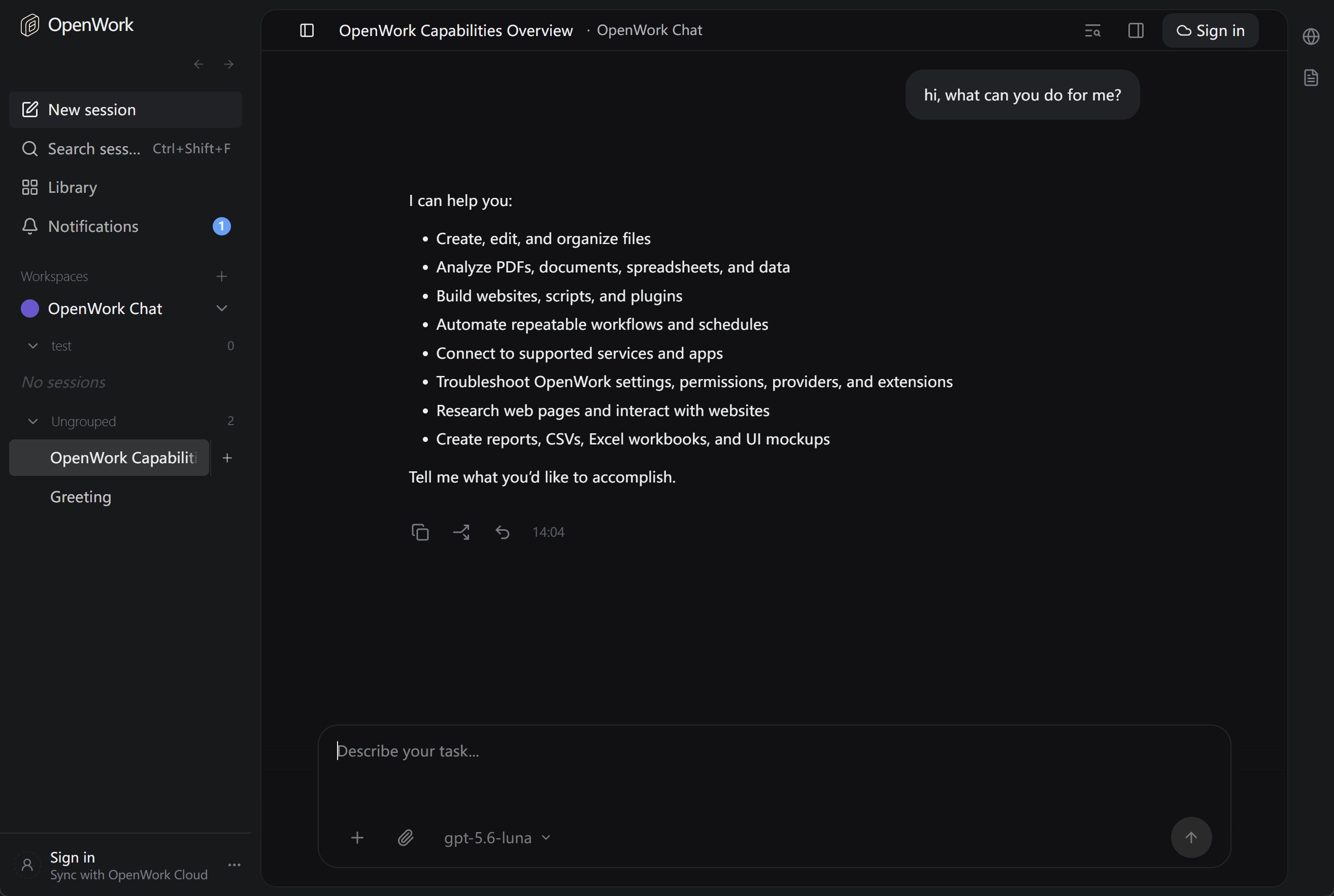
Once configured, you can select the provider and model (e.g., `mixroute-responses/gpt-5.6-luna`) from the conversation interface or settings.
* It is recommended to inject the API key via the `MIXROUTE_API_KEY` environment variable instead of writing it in plain text in the config file.
* If using a self-hosted or alternative service, change the **base URL** to the corresponding address, e.g., `http://your-server:3003/v1`.
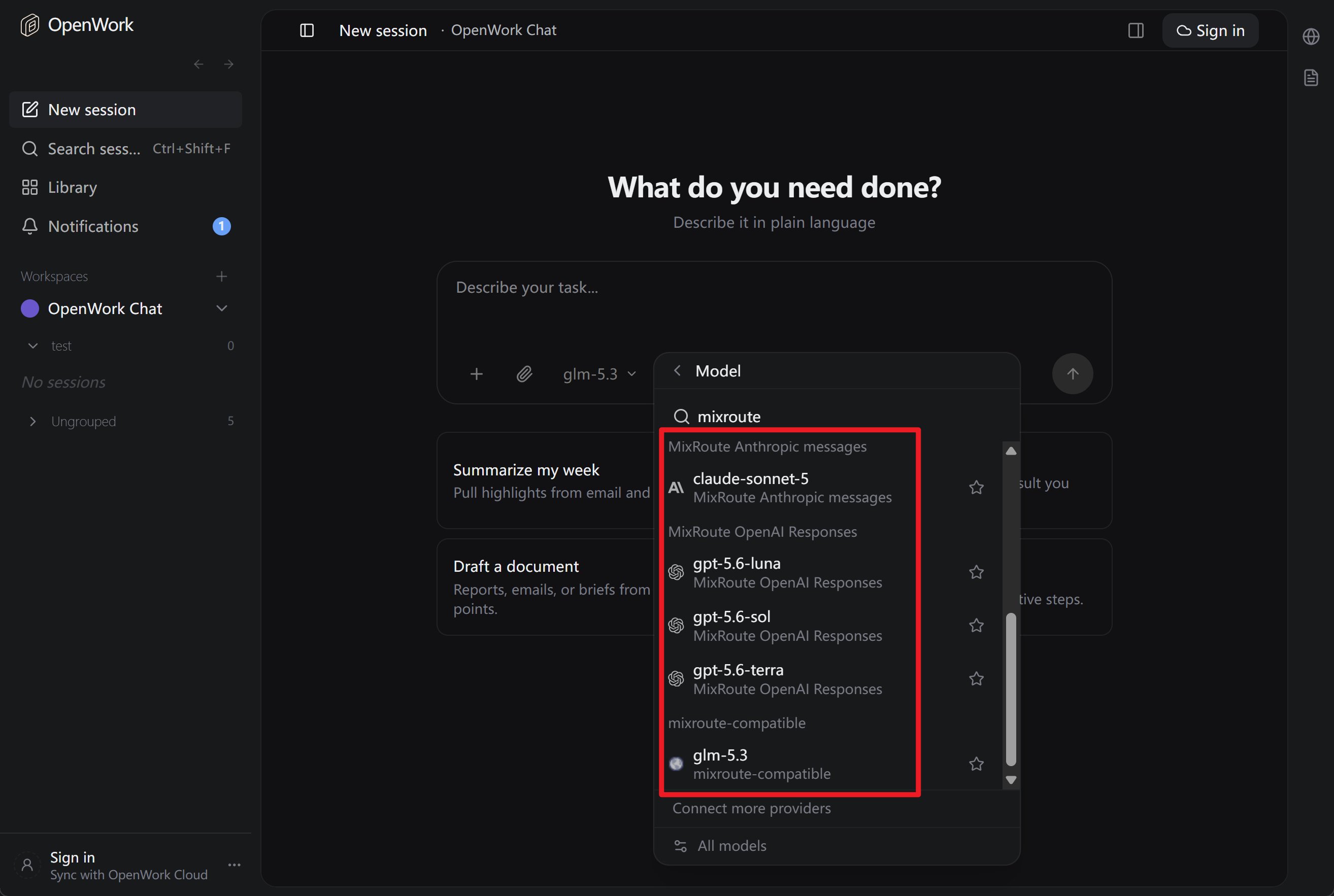 ### 2.4 Start OpenWork and Start a Conversation
After configuration, launch OpenWork and you will see the added models in the model selection list.
### 2.4 Start OpenWork and Start a Conversation
After configuration, launch OpenWork and you will see the added models in the model selection list.
 ## 3. Responses API Required for Some Models (Important)
Some models use a different API interface from the standard Chat Completions and require the **Responses API**. If you encounter an error like this when selecting such a model in OpenWork:
> The chatCompletion operation does not work with the specified model. Please choose a different model and try again.
This means the request is being sent via **Chat Completions**, but the model only supports **Responses API** on the server side. You need to configure it to use the correct interface.
### 3.1 Models That Require Responses API (Typical)
| Model ID / Series | Description |
| ----------------- | --------------------------------- |
| **gpt-5.6-luna** | GPT-5.6 Luna, Responses API only |
| **gpt-5.6-terra** | GPT-5.6 Terra, Responses API only |
| **gpt-5.6-sol** | GPT-5.6 Sol, Responses API only |
### 3.2 How to Configure in OpenWork
**Add a separate provider in the config file using `@ai-sdk/openai`** to make OpenWork use the **Responses API** for these models.
See the [Responses API section in Step 2](#responses-api-gpt-5x-codex-and-similar-models) for the specific configuration. Add the `mixroute-responses` provider to your `opencode.json` file.
### 3.3 Summary
| Scenario | Approach |
| ----------------------------------------------------------------------- | --------------------------------------------------------------- |
| Using **gpt-5.6-luna / gpt-5.6-terra / gpt-5.6-sol** (Responses models) | Add a separate provider in `opencode.json` using Responses API |
| Using **glm-5.3, claude-sonnet-5** (standard models) | Use `@ai-sdk/openai-compatible` or `@ai-sdk/anthropic` as usual |
## 4. Reference Links
* OpenWork Website & Download: [https://openworklabs.com/](https://openworklabs.com/)
* OpenCode Configuration & Models: [Models](https://opencode.ai/docs/models), [Providers](https://opencode.ai/docs/providers)
* MixRoute Console: [https://api.mixroute.ai/](https://api.mixroute.ai/)
## 3. Responses API Required for Some Models (Important)
Some models use a different API interface from the standard Chat Completions and require the **Responses API**. If you encounter an error like this when selecting such a model in OpenWork:
> The chatCompletion operation does not work with the specified model. Please choose a different model and try again.
This means the request is being sent via **Chat Completions**, but the model only supports **Responses API** on the server side. You need to configure it to use the correct interface.
### 3.1 Models That Require Responses API (Typical)
| Model ID / Series | Description |
| ----------------- | --------------------------------- |
| **gpt-5.6-luna** | GPT-5.6 Luna, Responses API only |
| **gpt-5.6-terra** | GPT-5.6 Terra, Responses API only |
| **gpt-5.6-sol** | GPT-5.6 Sol, Responses API only |
### 3.2 How to Configure in OpenWork
**Add a separate provider in the config file using `@ai-sdk/openai`** to make OpenWork use the **Responses API** for these models.
See the [Responses API section in Step 2](#responses-api-gpt-5x-codex-and-similar-models) for the specific configuration. Add the `mixroute-responses` provider to your `opencode.json` file.
### 3.3 Summary
| Scenario | Approach |
| ----------------------------------------------------------------------- | --------------------------------------------------------------- |
| Using **gpt-5.6-luna / gpt-5.6-terra / gpt-5.6-sol** (Responses models) | Add a separate provider in `opencode.json` using Responses API |
| Using **glm-5.3, claude-sonnet-5** (standard models) | Use `@ai-sdk/openai-compatible` or `@ai-sdk/anthropic` as usual |
## 4. Reference Links
* OpenWork Website & Download: [https://openworklabs.com/](https://openworklabs.com/)
* OpenCode Configuration & Models: [Models](https://opencode.ai/docs/models), [Providers](https://opencode.ai/docs/providers)
* MixRoute Console: [https://api.mixroute.ai/](https://api.mixroute.ai/)